

TaskColors 1.0.16
Colored Outlook Tasks are both a Planning and Management Booster.
Addins4Outlook
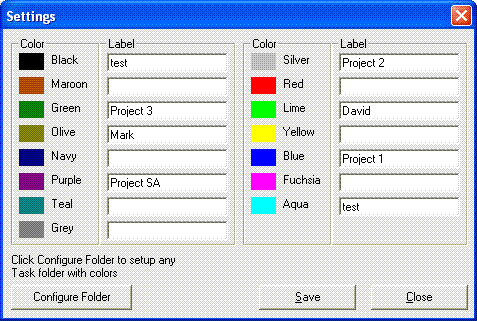
TaskColors 4Outlook is an Outlook addon that lets you color your task lists with different colors. This makes it faster and easier to identify important tasks. TaskColors 4Outlook is a valuable tool for both planning and management of your and your team's time.
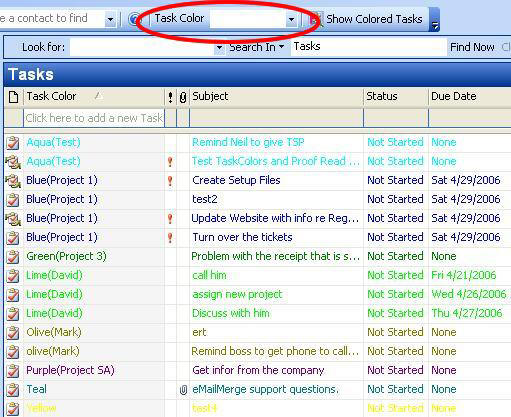
Task Colors works inside Outlook by adding a drop-down list of colors to your Task List. To change the color of a Task, simply click on the task and then choose the color from the list.
The selected task will automatically be displayed in your chosen color:
- Color Coding can make you better organized and more effective. Here are a few simple ways that colored Outlook task lists can help you.
- Project Based Color Coding: Assign a different color to each project. Quickly identify ALL tasks for a project by their color on your task list.
- Team/Delegated Tasks Coding: Color Code your tasks based on the person or team they have been delegated to. Make meetings more effective by quickly identifying tasks during decisions based on their color.
- Priority Based Color Coding: Use different colors to identify tasks of different priorities. Use this in combination with Outlook's built-in priority field for more effective organization (Tip: Color code all tasks for the current week Green and then mark Today's tasks high priority)
You will never loose a critical task in your list again: Color coding will ensure that you see all related tasks easily.


Oracle Corp. expects to generate about $65 billion in annual revenue by fiscal year 2026, an outlook executives first provided a year ago, in a lukewarm message to investors disappointed by the softwa...
In early June, sporadic but serious service disruptions plagued Microsoft’s flagship office suite — including the Outlook email and OneDrive file-sharing apps — and cloud computing platform. A shadowy...
Now, Microsoft has said a little more about what will happen to Windows 11’s existing Email and Calendar apps. Basically, they will cease to exist at the end 2024. In September next year, the new Outl...
 News archive...
| New Post | Top rated post |
|---|---|
|
August 04, 2014
How to recover my emails deleted from my computer?
August 04, 2014
How to Convert OST to PST File?
August 02, 2014
Can someone recommend non-Outlook PST viewer?
July 23, 2014
Moved to MS Exchange now Outlook rules wont work
July 19, 2014
Can't send e-mails from Outlook 2007 |
No results found.
|