

Send2 for Microsoft Outlook 1.20.0456
Send bulk e-mail to recipients from selected folders, e-mails, contacts, meetings, or tasks in one click.
4team
Whenever you plan:
- to send personalized group e-mail messages;
- to reply to numerous e-mails from the different recipients;
- to send an e-mail to recipients from selected e-mails, contacts, tasks, meetings or all recipients from any Outlook folder;
- to send a group message as a single e-mail to all recipients, or as a separate e-mail (send personally) to each recipient;
- to create a Distribution list from selected e-mails, contacts, meetings, tasks;
- to easily add contacts to an existing Distribution list;
- Send2 is at your disposal, a solution that will greatly facilitate such routine tasks.
Main Features:
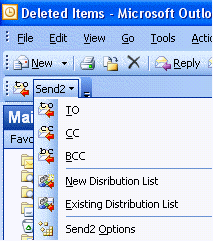
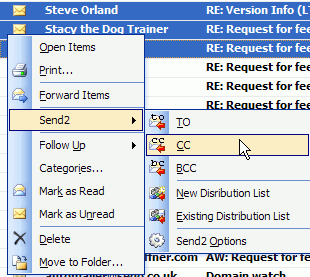
- Easy to create group messages - You can now create a bulk e-mail in only a few clicks, picking up recipients' addresses right in your current view, and adding them to "TO", "CC", or "BCC" fields in one click.
- New feature for personalizing group e-mails - It allows you to insert the appropriate contact details - Full Name, First Name, Middle Name, Last Name, Initials, Nickname and Company - for each recipient of a group message.
- New! "Send personally" feature - The final recipient will receive no information about any of the other recipients. Recipient will see only his/her name and address in the "To" "CC", "BCC" fields (a field of your choice), as if the message has been sent to him/her only.
- Adding addresses to recipient list from various sources - The destination addresses can be picked up from e-mails, tasks, meetings, or contacts.
- Adding the entire folder contacts into e-mail message in one click- Selecting a folder in the left Microsoft Outlook Navigation pane allows you to send a message to all recipients in this folder.
- New! Save group messages in Drafts, if you do not wish to send them out right away.
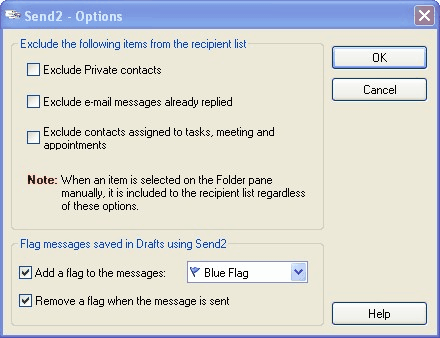
- New! The Send2 Options allow you to automatically flag the unsent group messages, and remove flags when these messages are sent out.
- Enhance standard Distribution list functionality- Send2 allows you to easily create a new distribution list or add new recipients to existing distribution lists.
- Plug-in for Microsoft Outlook - Integrated in the Microsoft Outlook Actions menu, shortcut menu and Microsoft Outlook toolbar.


Sep 24, 2023
Oracle Affirms Sales Outlook of $65 Billion by Fiscal Year 2026
Oracle Corp. expects to generate about $65 billion in annual revenue by fiscal year 2026, an outlook executives first provided a year ago, in a lukewarm message to investors disappointed by the softwa...
Jun 24, 2023
Microsoft on major Outlook and OneDrive outages: We were hacked
In early June, sporadic but serious service disruptions plagued Microsoft’s flagship office suite — including the Outlook email and OneDrive file-sharing apps — and cloud computing platform. A shadowy...
Jun 24, 2023
Outlook will replace Windows 11’s Mail and Calendar apps in 2024
Now, Microsoft has said a little more about what will happen to Windows 11’s existing Email and Calendar apps. Basically, they will cease to exist at the end 2024. In September next year, the new Outl...
 News archive...
| New Post | Top rated post |
|---|---|
|
August 04, 2014
How to recover my emails deleted from my computer?
August 04, 2014
How to Convert OST to PST File?
August 02, 2014
Can someone recommend non-Outlook PST viewer?
July 23, 2014
Moved to MS Exchange now Outlook rules wont work
July 19, 2014
Can't send e-mails from Outlook 2007 |
No results found.
|