

Outlook Attachments Security Manager
Define which attached files should be considered as "dangerous" for their further blocking, and which "secure" for granting access to them.
Office-Outlook.Com

Outlook Attachments Security Manager allows you to define which attached files should be considered as "dangerous" for their further blocking, and which "secure" for granting access to them.
If you often send various attachments by e-mail, you have come across the situation when Microsoft Outlook completely blocks access to potentially insecure types of files (e.g., to *.exe, etc.), even though you are absolutely sure about their safety. With the help of this Outlook add-in you can specify which file types are regarded dangerous and which ones - safe. You can permit access to the previously blocked file types, or fully prohibit access to the file types selected by you. If you are not sure about the safety of this operation, you can switch on the blocking of these file immediately after saving the required file.
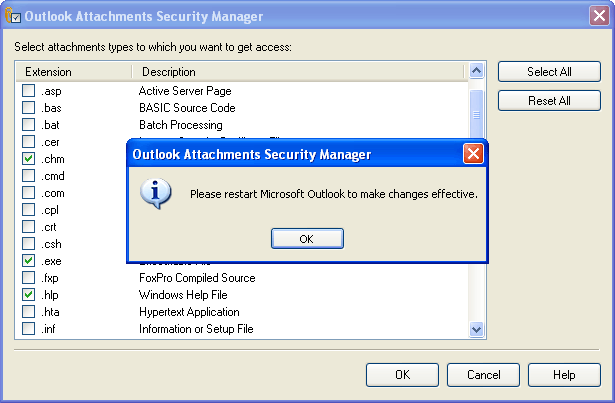
Outlook Attachments Security Manager enables you to:
- work with attached files of insecure types;
- manage access to different file types.
ATTENTION! All files that come with the emails must be checked before opening as they might contain viruses!
Outlook Attachments Security Manager is compatible with:
-
Microsoft Office Outlook 2000, 2002/XP, 2003, 2007
-
Microsoft Windows 98/Me - Vista.


Oracle Corp. expects to generate about $65 billion in annual revenue by fiscal year 2026, an outlook executives first provided a year ago, in a lukewarm message to investors disappointed by the softwa...
In early June, sporadic but serious service disruptions plagued Microsoft’s flagship office suite — including the Outlook email and OneDrive file-sharing apps — and cloud computing platform. A shadowy...
Now, Microsoft has said a little more about what will happen to Windows 11’s existing Email and Calendar apps. Basically, they will cease to exist at the end 2024. In September next year, the new Outl...
 News archive...
| New Post | Top rated post |
|---|---|
|
August 04, 2014
How to recover my emails deleted from my computer?
August 04, 2014
How to Convert OST to PST File?
August 02, 2014
Can someone recommend non-Outlook PST viewer?
July 23, 2014
Moved to MS Exchange now Outlook rules wont work
July 19, 2014
Can't send e-mails from Outlook 2007 |
No results found.
|