

MP*Print 1.6
Offers an automatic and highly configurable printing function.
AddOnMail
MP*Print is a plug-in integrated into the Rules Wizard as a Custom Action. MP*Print transforms basic printing into an automated high printing MP*Print function. MP*Print is available for standalone client workstation or on Windows 2000 server with TSE.
MP*Print allows you to:
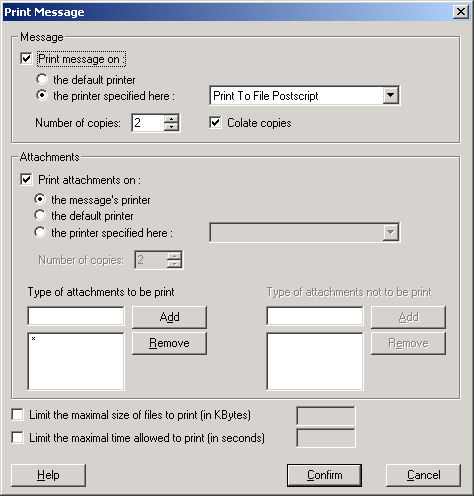
- Select the printer according to your own filters created with the Assistant,
- Select different printers for the body of the message and for the attachments,
- Define the list of authorized extensions (for example .doc, .rtf, .txt, if you only want to print text files and Word files).
The body message is saved as an RTF file that can be easily modified by the user with a RTF editor (i.e.: Microsoft Word). Custom elements (texts, images, logos) can be added to the template used to print messages.
MP*Print handles any attachment format if the application is available on the computer, HTML attachments included. As MP*Print follows rules defined by the Rules Wizard, you can select filters and other actions provided by the Assistant with the automatic printing. Those actions can be applied to incoming/outgoing messages and/or attachments previously stored.


Oracle Corp. expects to generate about $65 billion in annual revenue by fiscal year 2026, an outlook executives first provided a year ago, in a lukewarm message to investors disappointed by the softwa...
In early June, sporadic but serious service disruptions plagued Microsoft’s flagship office suite — including the Outlook email and OneDrive file-sharing apps — and cloud computing platform. A shadowy...
Now, Microsoft has said a little more about what will happen to Windows 11’s existing Email and Calendar apps. Basically, they will cease to exist at the end 2024. In September next year, the new Outl...
 News archive...
| New Post | Top rated post |
|---|---|
|
August 04, 2014
How to recover my emails deleted from my computer?
August 04, 2014
How to Convert OST to PST File?
August 02, 2014
Can someone recommend non-Outlook PST viewer?
July 23, 2014
Moved to MS Exchange now Outlook rules wont work
July 19, 2014
Can't send e-mails from Outlook 2007 |
No results found.
|