
Duplicate Posts Eliminator 3.0.55
Easily eliminate duplicate posts with this Outlook add-in.
Sperry Software
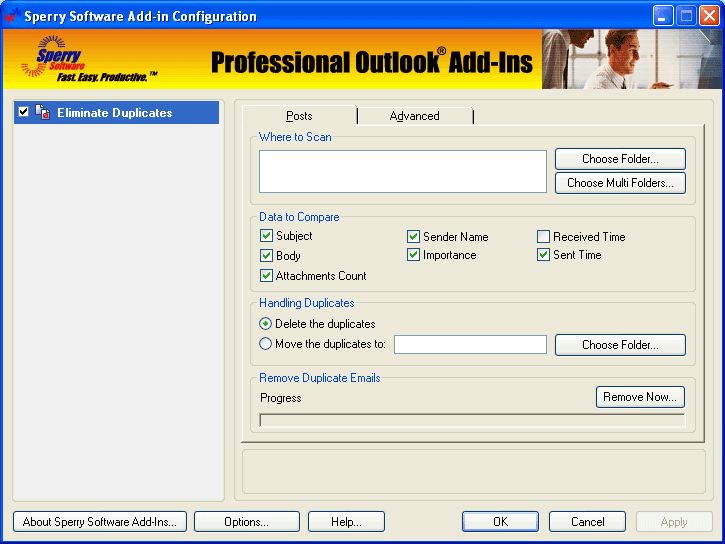
Occasionally, duplicate posts will occur in public folders (or shared folders) for many different reasons. One way to get rid of them is to form a table view and try to find a column that has something in common with all of the duplicates. Another way is to use our Duplicate Post Eliminator to quickly and easily remove them all.
How it works:
- Select the folder(s) where the posts reside, including Exchange public folders.
- Decide whether to delete the duplicates or move them to another folder.
- Begin eliminating duplicates.
The Duplicate Posts Eliminator includes these features:
- Allows you to either delete all the duplicates or move them to a folder of your choice.
- Works with Exchange public folders or other shared folders
- Comparisons of two posts (optionally) based on subject, body, attachments count, sender name, importance, received time, and sent time.
- You can choose to operate on a single folder or select many folders at once.
- Integrates directly into Outlook for easy access.
- Works with Microsoft Outlook 2003, Outlook 2002 and Outlook 2000.


Oracle Corp. expects to generate about $65 billion in annual revenue by fiscal year 2026, an outlook executives first provided a year ago, in a lukewarm message to investors disappointed by the softwa...
In early June, sporadic but serious service disruptions plagued Microsoft’s flagship office suite — including the Outlook email and OneDrive file-sharing apps — and cloud computing platform. A shadowy...
Now, Microsoft has said a little more about what will happen to Windows 11’s existing Email and Calendar apps. Basically, they will cease to exist at the end 2024. In September next year, the new Outl...
 News archive...
| New Post | Top rated post |
|---|---|
|
August 04, 2014
How to recover my emails deleted from my computer?
August 04, 2014
How to Convert OST to PST File?
August 02, 2014
Can someone recommend non-Outlook PST viewer?
July 23, 2014
Moved to MS Exchange now Outlook rules wont work
July 19, 2014
Can't send e-mails from Outlook 2007 |
No results found.
|