
Attachment Save 3.5.77
Automatically remove and/or save email attachments with this Outlook add-in.
Sperry Software
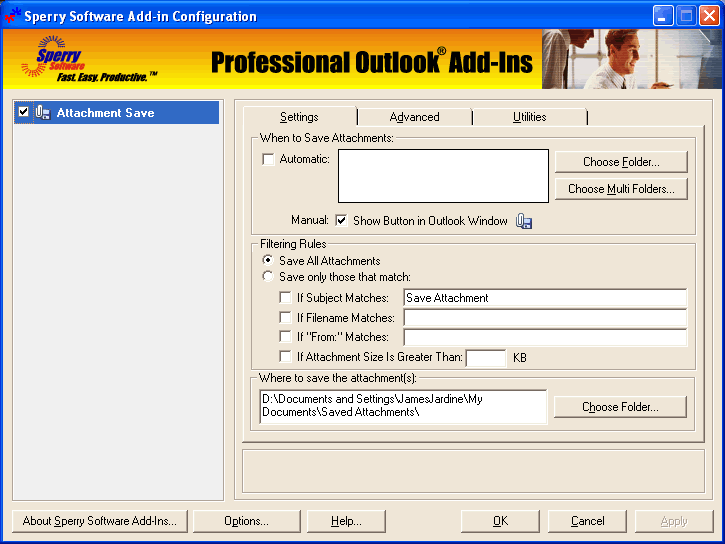
Save space in your Outlook Inbox (or any other Outlook folder) by removing the file attachments off your email and saving them to a Windows folder as the email arrives. Eliminate tedious hours of labor with customizable rules that allow you to save and remove email attachments from certain people, only when certain subjects are present, only when certain attachment filenames are used or choose to save all attachments.
Features of the Attachment Save add-in include:
- Integrates directly into Outlook for easy access
- Runs automatically in the background or in manual mode
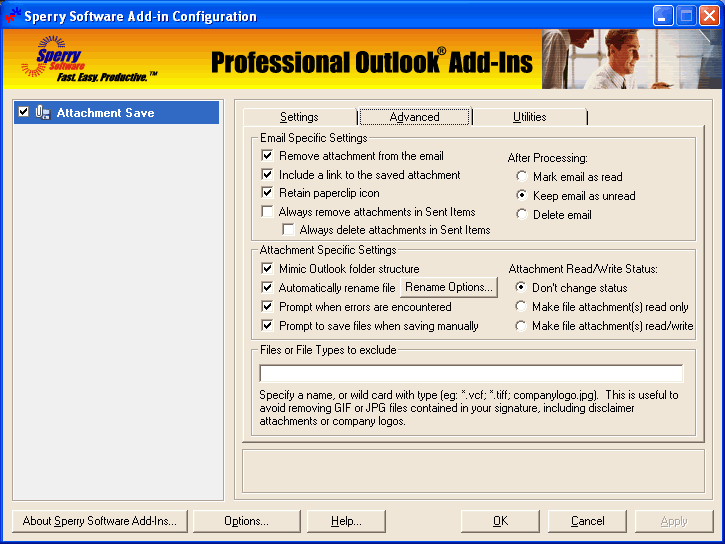
- Replaces attachments with URL links to the saved file
- Retains the paperclip icon, but removes the attachment
- Automatically removes the URL when replying or forwarding the email
- Asks you if you want to delete the attachment if deleting an email
- Undo feature reverses out all changes and put attachments back in place
- Allows for automatic renaming or overwriting of files
- Saves the attachment in a Windows sub-folder (mimics the Outlook folder structure)
- Works with Exchange public folders or any other shared folders
- Updates previously written URLs with a new URL with a single click
- Marks the email as read/unread/deleted after processing
- Monitors multiple folders at the same time
- Works with Microsoft Outlook 2003, Outlook 2002 and Outlook 2000
- Coded to avoid the Outlook security prompts
Also, you can scan all your previous email messages for attachments, not just new ones that come in. This feature is perfect for your Sent Items folder, where a copy of all the attachments you've ever sent are hanging around taking up valuable space. You can then compact your Outlook PST files, making Outlook operate safely and more efficiently.


Oracle Corp. expects to generate about $65 billion in annual revenue by fiscal year 2026, an outlook executives first provided a year ago, in a lukewarm message to investors disappointed by the softwa...
In early June, sporadic but serious service disruptions plagued Microsoft’s flagship office suite — including the Outlook email and OneDrive file-sharing apps — and cloud computing platform. A shadowy...
Now, Microsoft has said a little more about what will happen to Windows 11’s existing Email and Calendar apps. Basically, they will cease to exist at the end 2024. In September next year, the new Outl...
 News archive...
| New Post | Top rated post |
|---|---|
|
August 04, 2014
How to recover my emails deleted from my computer?
August 04, 2014
How to Convert OST to PST File?
August 02, 2014
Can someone recommend non-Outlook PST viewer?
July 23, 2014
Moved to MS Exchange now Outlook rules wont work
July 19, 2014
Can't send e-mails from Outlook 2007 |
No results found.
|