

Task Email Scheduler 3.0
Send scheduled messages automatically with help of the standard Outlook scheduler.
MAPILab Ltd.
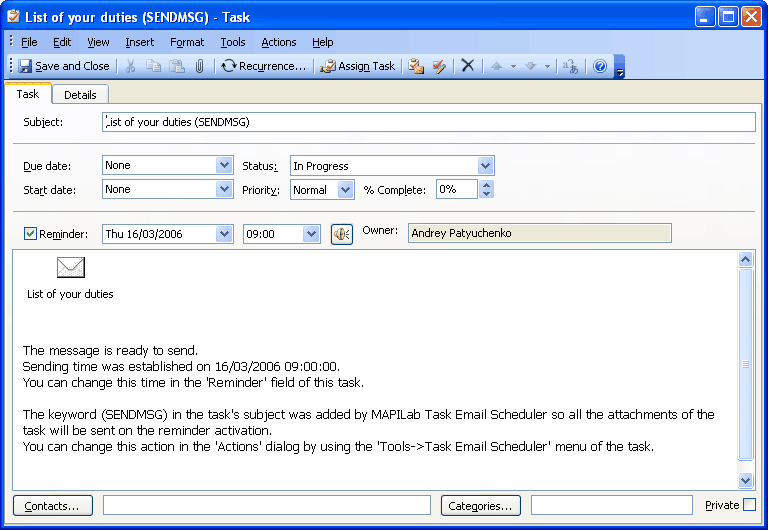
The Task Email Scheduler is virtually identical to the Email Scheduler , but this Outlook addin is aimed at the group of users that are used to working with the standard Microsoft Outlook scheduler. As with Email Scheduler, when creating a new message you can click the “Task Email Scheduler” button and set the parameters of sending. At the same time, a new task will be added in the standard Microsoft Outlook scheduler. This task will contain the message with all attached files. The message will be sent out at the appointed time.
With Task Email Scheduler you are able to:
- send out the messages at the appointed time;
- make a message distribution at stated intervals of time;
- attach files to the scheduled messages.
Task Email Scheduler is one of the 18 components of MAPILab Toolbox. If you'd like to learn more about other Outlook add-ins and download a trial version of the program please visit MAPILab Toolbox product page. You can buy this set of 18 different Microsoft Outlook add-ins for the price of one!
Technical requirements and compatibility of the MAPILab Toolbox:

- Microsoft Outlook 2007, 2003, 2002/XP, 2000;
- Microsoft Windows 98, NT, ME, 2000, XP, 2003, Vista.
Supported languages (program interface and help file):
- English;
- Russian;
- German.


Oracle Corp. expects to generate about $65 billion in annual revenue by fiscal year 2026, an outlook executives first provided a year ago, in a lukewarm message to investors disappointed by the softwa...
In early June, sporadic but serious service disruptions plagued Microsoft’s flagship office suite — including the Outlook email and OneDrive file-sharing apps — and cloud computing platform. A shadowy...
Now, Microsoft has said a little more about what will happen to Windows 11’s existing Email and Calendar apps. Basically, they will cease to exist at the end 2024. In September next year, the new Outl...
 News archive...
| New Post | Top rated post |
|---|---|
|
August 04, 2014
How to recover my emails deleted from my computer?
August 04, 2014
How to Convert OST to PST File?
August 02, 2014
Can someone recommend non-Outlook PST viewer?
July 23, 2014
Moved to MS Exchange now Outlook rules wont work
July 19, 2014
Can't send e-mails from Outlook 2007 |
No results found.
|