
Auto Print 3.1.0
Automatically print email and file attachments with this Outlook add-in.
Sperry Software
Automatically prints email as it arrives at your Inbox without you having to do anything. Easily perform your record keeping of your most important email messages by printing them. Perfect for hardcopy logs, just turn on your printer and go! Because it also works on outgoing email, you can easily create a log of all your sent items.
Features of the Auto Print add-in include:
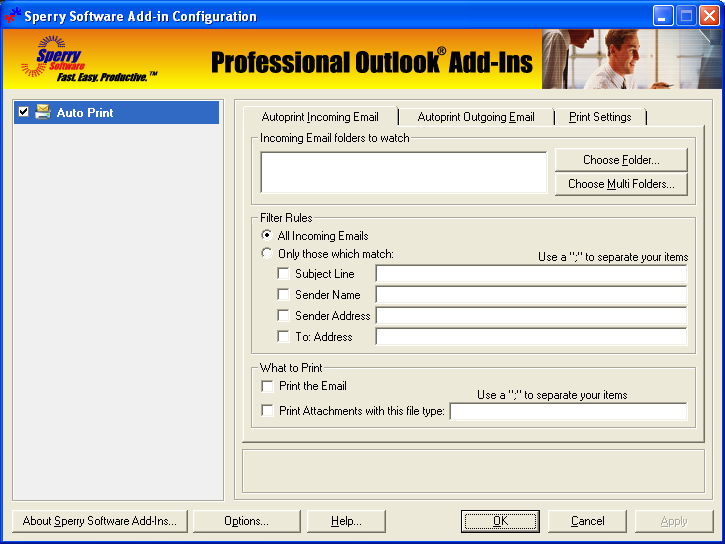
- Easily enable/disable the add-in
- Prints the title and the name of attachments in addition to the email itself
- Print just the email, just the attachment, or both
- Print email that arrives at your Inbox or any other Outlook folder
- Powerful filters allow you to print email containing certain subjects only or from certain senders only
- Select multiple subjects and/or multiple senders, or print all incoming email
- "Print Now" capability allows printing of emails and/or attachments in one or multiple folders
- "Print Now" can be filtered by the built-in filters for fine grained control over what prints out
- Ability to optionally delay between prints means that the emails and attachments print in order (i.e., one email, then its attachments, next email, etc.)
- Works on outgoing email as well
- Works with Microsoft Outlook 2003, Outlook 2002 and Outlook 2000
- Integrates directly into Outlook for easy access


Oracle Corp. expects to generate about $65 billion in annual revenue by fiscal year 2026, an outlook executives first provided a year ago, in a lukewarm message to investors disappointed by the softwa...
In early June, sporadic but serious service disruptions plagued Microsoft’s flagship office suite — including the Outlook email and OneDrive file-sharing apps — and cloud computing platform. A shadowy...
Now, Microsoft has said a little more about what will happen to Windows 11’s existing Email and Calendar apps. Basically, they will cease to exist at the end 2024. In September next year, the new Outl...
 News archive...
| New Post | Top rated post |
|---|---|
|
August 04, 2014
How to recover my emails deleted from my computer?
August 04, 2014
How to Convert OST to PST File?
August 02, 2014
Can someone recommend non-Outlook PST viewer?
July 23, 2014
Moved to MS Exchange now Outlook rules wont work
July 19, 2014
Can't send e-mails from Outlook 2007 |
No results found.
|